
Schengen Visa Tracking Status Explained: Under Process, Dispatched, No Records, Invalid Application and EES "Not OK"
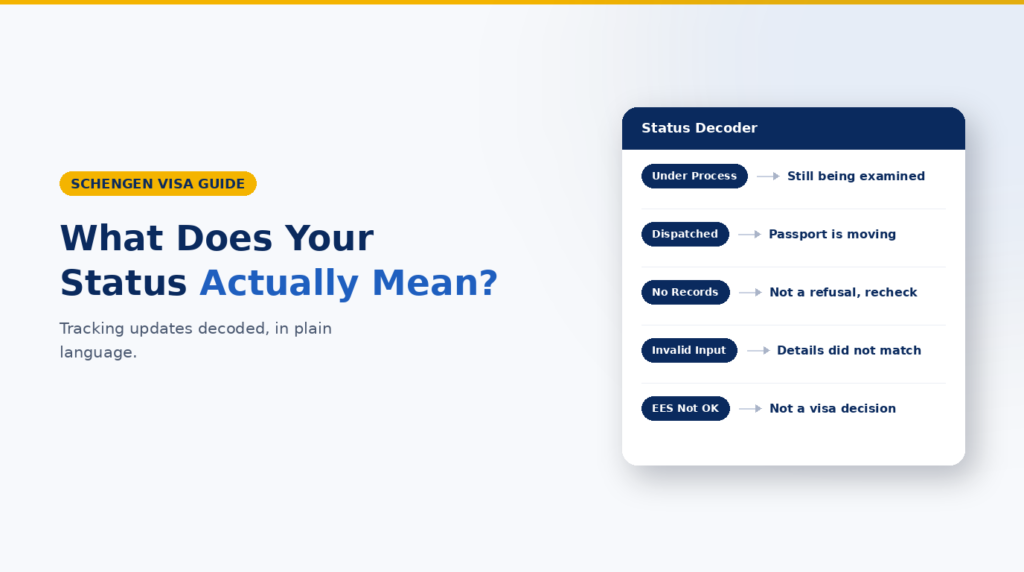
Schengen visa tracking messages usually show where an application or passport is, not whether the visa was granted. “Under process” means handling or examination continues; “dispatched” means the passport or decision envelope has moved; and “no records” or “invalid input” usually calls for a data or portal check. EES “Not OK” is a separate border or authorised-stay response and is not, by itself, a visa refusal or an entry-refusal decision.
What Schengen visa tracking can – and cannot – tell you
A tracking portal may show that your application was received, sent to the competent consulate, processed, returned to the visa application centre, dispatched by courier or made ready for collection. The wording varies between countries and providers such as VFS Global, TLScontact, BLS International and Capago.
An external visa application centre normally manages collection and logistics; the competent embassy or consulate makes the visa decision. A logistics message does not normally disclose that decision. The reliable confirmation is the passport with the visa sticker, an official approval notification where applicable, or a written refusal notice.
Official EU guidance gives a normal examination period of 15 calendar days, extendable to 45 days when further examination or documents are needed. Transfer and delivery time can be additional.
Schengen visa tracking statuses compared
Status shown | What it usually means | Best next step |
|---|---|---|
Application received | The centre has registered the file. | Keep the receipt and monitor updates. |
Under process at VAC | Administration or transfer continues; no decision is shown. | Wait unless information is requested. |
Under process at embassy/consulate | The authority is examining the file; no outcome is shown. | Stay reachable through official channels. |
Processed / decision returned | Examination ended or the decision envelope returned; the result may remain hidden. | Wait for collection or delivery. |
Dispatched | The passport or envelope moved. This is not proof of approval. | Use courier or collection instructions. |
Ready for collection | The passport or decision document can be collected; the outcome may remain hidden. | Collect it and inspect the documents. |
No records found | The details cannot be matched or the record is not yet visible; this is not a refusal. | Check the entries and retry later. |
Invalid input/application | Often an entry, format or record-matching problem. | Use the receipt details exactly. |
EES “Not OK” | A separate travel or authorised-stay response, not application tracking. | Check the official EES context. |
Status wording is provider- and route-specific. Read the message literally and verify unusual wording on the relevant official portal.
What each important status means
1. “Under process”
“Under process” means the file is still moving through an administrative or examination stage. “At the visa application centre” can refer to registration or transfer. “At the embassy/consulate” usually means the competent authority has the file. Neither wording predicts approval, refusal or the exact completion date.
Example: A change from “under process at VAC” to “under process at the consulate” shows movement to the deciding authority, not that approval is close.
2. “Processed”, “decision received” or “returned to the centre”
These messages generally mean examination has ended or the passport/decision envelope has been returned to the application centre. They usually do not reveal what the decision is. Avoid treating the speed of processing as a clue: a quick or slow case can have either outcome.
3. “Dispatched” or “ready for collection”
“Dispatched” is a movement update. The item may be travelling from the consulate to the centre, from the centre to a courier, or from the courier to you. “Ready for collection” means the item can be collected under the centre’s rules. Neither phrase, without an explicit decision notice, means “visa approved.”
4. “No records found”
This message usually means the portal cannot find a matching record. Common explanations include:
- Using the wrong portal for the country of application, destination or service provider.
- Entering an appointment or online-form number instead of the tracking reference printed on the receipt.
- A spelling, format or surname mismatch.
- Checking before the record is visible or during a system issue.
Copy the reference exactly, use the personal details requested on that portal and retry later. If the message continues, contact the application centre through the contact page for your exact route. Do not post your tracking number or passport details publicly.
5. “Invalid application” or “invalid input”
“Invalid input” normally means the tracking fields were not accepted or did not match a visible record. Some interfaces may use broader wording such as “invalid application” or “invalid reference.” Do not assume this means the consulate declared the visa application legally invalid, inadmissible or refused. Only an explicit official notice can establish that.
Check whether the portal asks for a receipt reference, tracking ID, surname, date of birth or another identifier. VFS pages, for example, commonly direct applicants to use the reference printed on the invoice or receipt, but the required fields vary by route. Use the official tracking page linked to your application centre, not a generic search result or third-party tracker.5
6. EES “Not OK”
The Entry/Exit System (EES) is an EU border system for registering short-stay travel by relevant non-EU nationals. It is not the portal that tracks a pending Schengen visa application. The EES framework uses “OK,” “NOT OK” and, in some situations, other responses for authorised-stay or carrier checks.4
EU rules say the public authorised-stay service can return “NOT OK” with zero remaining days in specified situations. Carrier checks can also return “Not OK.” Crucially, the rules require a warning that OK/NOT OK cannot be interpreted as a decision to grant or refuse entry. See the official EES information and Commission Implementing Regulation (EU) 2021/1224.
EES “Not OK” does not mean that a pending Schengen visa was refused. It is an EES response in a different travel or authorised-stay check, and it is not itself a border-entry decision.
Confirm that you used the official EES service and recheck the passport number, issuing country, destination, intended dates and any visa sticker. If travel is imminent and the result conflicts with your documents, ask the carrier and competent authority for guidance.
What to do when the status is unclear or unchanged
- Save the exact message, date and time. A screenshot helps if you need support.
- Confirm the correct portal for the country, provider and location where you applied.
- Enter the receipt reference and personal details exactly as requested.
- Check email, spam, SMS and courier messages for a more recent update.
- Compare the elapsed time with the official consulate or provider guidance for your visa type and location.
- If the stated period has passed, or an official message asks you to act, send one clear enquiry with your reference and submission date. Never send full passport or payment details through an unverified channel.
Buying guidance while you wait
Travel medical insurance
A tracking message alone is not a reason to buy a duplicate policy. If dates change or updated evidence is requested, ask whether the policy can be amended. Compare insured dates, geographic scope, medical and repatriation cover, exclusions, assistance, claims and cancellation terms. Never assume direct settlement is guaranteed.
SchengenSure offers a travel medical insurance comparison page. Verify the policy wording and current consular requirements before purchase. Buying through any link cannot influence a visa decision.
Europe eSIM
Consider an eSIM after your passport is returned and the trip is reasonably confirmed. Compare coverage, data, validity, tethering, activation, device compatibility and refunds. SchengenSure’s Europe eSIM page is an optional starting point. Some SchengenSure links may be affiliate links, with no effect on the visa outcome.
Common mistakes to avoid
- Reading “dispatched” or “processed” as proof of approval.
- Using EES as a pending-visa application tracker.
- Entering the appointment number instead of the receipt tracking reference.
- Using a portal for the wrong destination country or application location.
- Booking new non-refundable travel because the logistics status looks positive.
- Sharing an application reference, passport number or screenshot publicly.
Schengen visa status checklist
- Read and save the complete status, not only one word.
- Confirm the official provider and application-country portal.
- Match the reference, surname and date format to the receipt.
- Check email, SMS, spam and courier tracking.
- Use official timelines and contact instructions for your location.
- When the passport returns, check the visa sticker details or read the refusal notice carefully.
Frequently asked questions
Does “under process” mean my Schengen visa will be approved?
No. It means handling or examination is continuing. It does not predict the decision.
Does “processed visa application dispatched” mean approved?
No. It normally means the passport or decision envelope has moved after processing. The returned documents confirm the outcome.
Is “no records found” a visa refusal?
No. It usually indicates a portal, reference, formatting, synchronisation or temporary system problem. Recheck the official tracking details.
Does “invalid input” mean my application is invalid?
Not necessarily. It commonly means the details entered do not match the tracking record or required format. Look for a separate official notice before drawing any conclusion.
Does EES “Not OK” mean my Schengen visa was rejected?
No. EES is separate from pending-visa tracking. “Not OK” is an EES response used for travel or authorised-stay checks and is not itself a visa-refusal or entry-refusal decision.
How will I know the final visa decision?
Check the returned passport and any official decision notice. A visa sticker confirms issuance; a refusal notice explains the refusal and available appeal information.
Conclusion
Read a Schengen visa tracking status literally. “Under process” means handling continues; “processed,” “dispatched” and “ready for collection” describe completion or movement; and “no records” or “invalid input” calls for a data check. None proves approval or refusal without official confirmation.
Keep EES separate from visa tracking. If EES returns “Not OK,” verify the official service and your travel details, but rely on the competent authority – not the status alone – for a visa or border decision.