
Mistake in a Schengen Visa Application Form: Wrong Name, Date, Signature or Passport Details
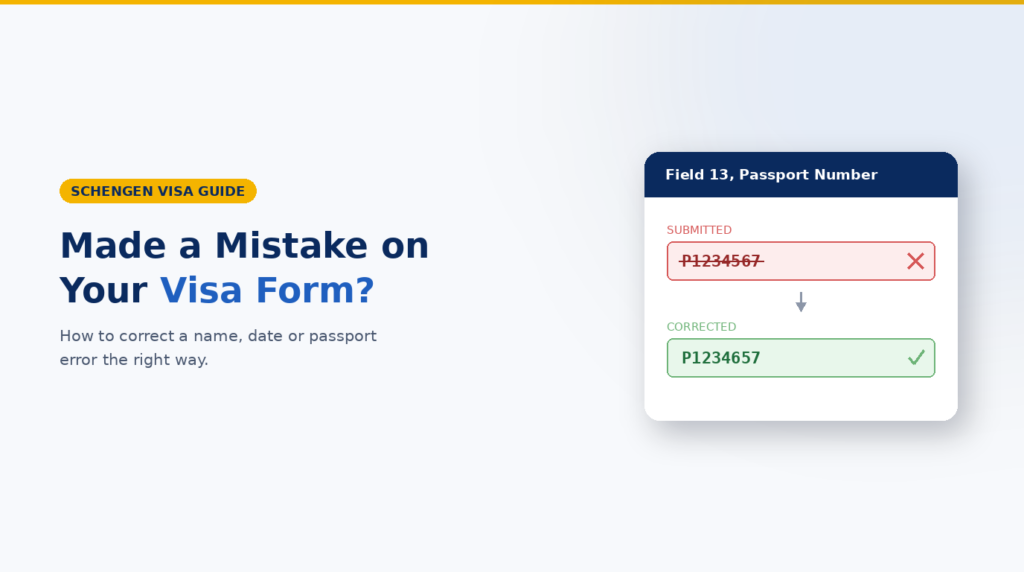
Correct a Schengen visa application form mistake as soon as you notice it. Before lodging, follow the portal or appointment instructions for a corrected form; after lodging, contact the responsible application centre or consulate and ask how the correction must be recorded. Do not hide the error, alter documents or assume that every typo has the same effect.
Scope: This guide covers ordinary short-stay Schengen visa applications. Long-stay visas, residence permits and individual national portals may use different forms and correction processes. The responsible authority’s current instructions are final.
First decide whether the error is minor or material
No universal rule makes every spelling error harmless or every wrong entry a refusal reason. Its importance depends on the field, the evidence and whether it creates doubt about the applicant or trip.
Quote-worthy rule: A correction is credible when it is prompt, truthful and consistent across the form, passport and supporting documents.
Identity-critical details deserve immediate attention: full name, date of birth, nationality, passport number, issue and expiry dates. VFS Global also identifies mismatches in names, passport numbers and dates of birth as common application errors.
Travel, sponsor and employer details should agree with the bookings, invitation, finances and insurance. An optional-field formatting issue may be less significant, but the responsible authority decides what correction it needs.
What to do depends on when you find the mistake
When found | Best first action | Do not assume |
|---|---|---|
While drafting | Correct the entry, then recheck it against the passport and supporting documents. | That an auto-filled value is accurate. |
Form generated, before appointment | Check the portal and local instructions. Create and print a corrected form if that process permits or requires it. | That every country’s platform works like France-Visas or VIDEX. |
At the appointment, before lodging | Tell the counter staff before the file is accepted and follow their correction instructions. | That an unapproved handwritten edit is acceptable. |
After lodging or biometrics | Contact the responsible application centre or consulate through its official channel and quote the application reference. | That a new form, email attachment or second application will automatically replace the lodged record. |
After the visa is issued | Check the visa sticker and report an error to the issuing mission immediately. | That a sticker error can be solved by changing the old application form. |
Portal workflows differ. German VIDEX explains that the form is prepared online but lodged with the mission or authorised provider. France-Visas tells applicants to complete and print a corrected form. Check local instructions instead of copying another country’s process.
How to correct common Schengen visa form errors
Wrong name or date of birth
Copy the biodata exactly from the passport you will use. Do not translate, shorten or rearrange the name unless instructed. German VIDEX says first names should appear as they do in the passport. [
Wrong passport number, issue date or expiry date
Treat this as an identity-critical mismatch. Compare the form character by character with the passport biodata page. Then check whether the same wrong value appears in the appointment record, invitation, insurance certificate or another supporting document.
Wrong travel date, destination or purpose
Correct the form only to reflect the real trip. Do not redesign the itinerary simply to hide a mismatch. If plans genuinely changed, align the explanation, accommodation, transport, invitation and insurance, and ask the responsible authority whether updated evidence should be provided.
Missing or incorrect signature
The Visa Code and Commission handbook requires a completed and signed form. A minor’s form must be signed by the person or persons exercising parental authority or by the legal guardian. Follow the local instructions on where and when to sign; do not backdate a signature or sign for another adult. [2][3]
If the application has already been lodged
Use the official contact channel for the centre or consulate. State the application reference, the incorrect entry and the correct entry. Ask whether it wants a correction note, revised form, supporting document or no further action.
Important: Do not send passport scans, bank statements or insurance documents to an address found in a forum or unofficial message. Do not lodge a second application or cancel bookings unless the responsible authority tells you that this is necessary.
What a correction note should contain
- Applicant’s full name and official application reference.
- The field containing the error, the incorrect value and the correct value.
- A brief factual explanation of how the error occurred and when it was noticed.
- A list of any supporting documents affected by the correction.
- A clear request for instructions or confirmation that the correction has been added.
Practical example: Field 13 shows passport number P1234567. The correct number on the passport biodata page is P1234657. The applicant should identify both values clearly rather than writing only ‘passport number is wrong.’
Check the whole file, not only the form
One corrected field can create new inconsistencies. Recheck the passport, appointment confirmation, cover letter, invitation, flight reservation, accommodation, financial records and travel medical insurance. Names and dates should describe one applicant and one real journey.
Neutral buying guidance for bookings and insurance
If a booking contains the same error, read the supplier’s change and cancellation terms before paying for a replacement. Ask whether the name or date can be corrected and obtain written confirmation. Do not buy a new non-refundable ticket merely to make the application look cleaner.
For insurance, check the traveller name, territory, policy dates and any identity details shown. Ask for a corrected certificate or endorsement before buying again. If replacement cover is needed, compare coverage, exclusions, deductible, assistance, claims and change terms – not price alone.
SchengenSure option: Use the cross-document consistency checker before lodging. If a replacement policy is needed, compare Schengen visa travel medical insurance and verify the final certificate against the responsible authority’s checklist. No tool, booking or policy can guarantee visa approval.
Common correction mistakes
- Crossing out or overwriting a signed form without checking whether handwritten corrections are accepted.
- Taking an old and a corrected form to the appointment without identifying which version should be used.
- Correcting the form but leaving different names or dates on bookings, invitations or insurance.
- Sending sensitive documents through an unofficial email address, agent or social-media account.
- Hiding a known error or inventing a new explanation to make the file appear consistent.
- Panic-buying duplicate flights, hotels or insurance before checking amendment options.
- Assuming an error on an issued visa sticker can be corrected by editing the original form.
Schengen visa form correction checklist
- Identify the exact field and the correct value.
- Compare identity details with the passport biodata page.
- Record when the mistake was discovered: draft, before appointment, after lodging or after issue.
- Check the responsible consulate, portal and application-centre instructions.
- Use a corrected form only through the process the authority accepts.
- Tell appointment staff about the error before the file is accepted.
- For a lodged application, use the official contact channel and quote the reference.
- Recheck invitations, bookings, cover letter, finances and insurance for the same mismatch.
- Keep copies of the correction request and any response.
- Inspect the visa sticker immediately when the passport is returned.
Frequently asked questions
Will one typo cause my Schengen visa to be refused?
Not necessarily. The effect depends on the field, the surrounding evidence and whether the error affects identity or the credibility of the trip. Correct or disclose it promptly through the accepted process.
Can I cross out a mistake and initial it?
Only if the responsible authority or appointment staff allows that method. Some processes expect a newly generated form. Do not assume an unapproved handwritten change will be accepted.
Can I take a new form to my visa appointment?
Possibly. France-Visas expressly tells applicants with a mistake to complete and print a new form, but other portals and centres may work differently. Check the instructions for your application route. [4]
What if I forgot to sign the application form?
Follow the local instructions on where and when to sign. The form must be signed, and a minor’s form requires the appropriate parental-authority or guardian signature. [2][3]
What should I do about a wrong passport number after submission?
Contact the responsible application centre or consulate promptly through its official channel. Give the reference and ask what corrected evidence it requires; do not assume an email or new form automatically changes the lodged file.
What if the mistake appears on the issued visa?
Check the sticker against the passport immediately and contact the issuing visa section. German official guidance, for example, tells applicants to report sticker errors at once so the mission can address them. [6]
Conclusion
Handle a Schengen visa application form mistake calmly and transparently. Identify the error, follow the procedure for the application stage, and align the form with the passport and supporting documents. If the process is unclear, ask the responsible centre or consulate.